


Inspo - Recipes & Meal Planner
4.6129.00 Reviews
App Specs
- Version
- 5.9
- Updated On
- License
- Free
- Downloads
- 50,000+
- Developer
- Pinecone Labs LLC
- Categories
- Food & Drink
- Platform
- Android
Screenshots

 Analysis by AppCompare
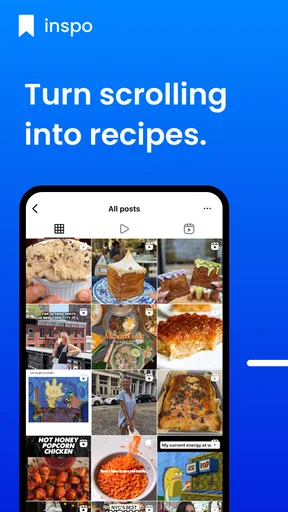
I often save recipes while scrolling, then forget where I saw them when it is time to cook. Inspo - AI Recipe Keeper is aimed at that familiar problem: keeping food inspiration gathered from social media and websites in one place. I see its main appeal less as a replacement for cooking knowledge and more as a way to turn passing inspiration into something I can revisit when planning a meal.
What you get before paying
Inspo is a free food-and-drink app from Pinecone Labs LLC, with optional in-app purchases priced from $5.99 to $23.99 per item. That makes the basic decision straightforward: you can try the app without paying upfront, then decide whether any paid option is worth considering. I would treat the purchase range as a reason to check the offer shown in the app before committing, rather than assuming every useful function requires payment or that one purchase unlocks everything.
The app is rated for Everyone and has a 4.6 average from around 250 ratings. It has passed 10,000 installs, and its current version is 1.5. Those figures suggest there is an established group of users, though they cannot tell me whether the app will suit my own cooking habits. It was released in May 2025 and works on Android 6.0 or later, which is useful if you keep an older phone in the kitchen.
Why a recipe keeper can earn its place
The practical value of a recipe-saving app is not simply having more recipes. It is reducing the gap between seeing something appetizing and being able to find it again. When I encounter a dish in a social post or on a food website, saving it for later is more useful than leaving it buried in a feed, a browser tab, or a message to myself. Inspo’s central promise is to make that handoff easier.
I would judge it by how well it fits the way I already discover food. If most of my inspiration comes from social media and websites, a dedicated place for those finds can be more convenient than bookmarking pages across several apps. If I already have a dependable system—such as a carefully organized notes app or a recipe manager I use every week—the benefit may be smaller. The app has to make retrieval easier, not just move the pile of saved ideas somewhere else.
A useful habit, with a few trade-offs
My most practical tip is to save a recipe when I first see it, then give it a clear mental purpose: a quick dinner idea, something to try on a weekend, or a dish for guests. Even without assuming any particular organizational feature beyond saving recipes, deciding why I want to keep an item makes a later search more purposeful. A collection of attractive dishes can still become clutter if I never distinguish realistic weeknight options from ambitious projects.
There is also a small but important trade-off with recipes originating on other sites. A saved recipe is not automatically the same thing as a tested, ready-to-cook meal. The source may include a long introduction, unusual ingredients, or steps that need adjusting to my kitchen. I would read through a recipe before shopping, check the quantities and method, and keep the original source in mind when details matter. That habit helps avoid treating a saved post as if it had already been adapted to my needs.
Worth Reading Before You Choose

EA SPORTS FC Mobile 26 Is a Bigger Football Game, but It Takes Time

Flipboard Shows What News Apps Must Do Beyond the Feed

Switching to Android Auto Means Rethinking Your Driving Routine

Google Calendar Makes a Crowded Week Easier to Manage

Ludo King Makes the Most of the Minutes Between Plans

Baby Panda World Brings Quick Play to Modern Phones, but Its Game Library Feels Busy
Making the choice fit your kitchen
I’d use this section to make the decision practical: the best recipe keeper is the one that fits the way you actually discover and revisit food ideas. I’d start by noticing whether recipes currently get lost in social feeds, browser tabs, or notes, then choose a simple routine that makes saved inspiration easier to act on.
When I would reach for it
Imagine that I am on the bus home and spot a recipe that looks promising. I save it instead of trying to remember the creator’s name or searching through yesterday’s feed at dinner time. Later, I can return to the idea while deciding what to cook or what to buy. That simple workflow is where a keeper can be genuinely useful: it catches inspiration at the moment it appears and gives it a better chance of becoming dinner.
This is especially appealing if you collect recipes from several places and often find yourself thinking, “I know I saw a good version of that somewhere.” It may also suit someone who is still building a personal rotation of meals. Saving a handful of dishes that look manageable can make browsing less aimless, provided you are willing to revisit them and choose what fits your time and ingredients.
How it compares with familiar alternatives
Compared with browser bookmarks, a recipe-focused app has a more food-centered purpose: it is meant to be a place for cooking inspiration rather than every kind of page you might want to revisit. Bookmarks remain a sensible choice if you only save an occasional recipe and prefer not to maintain another app. Social-media saves are quick at the moment of discovery, but they can leave recipes mixed in with unrelated posts and make a specific dish harder to find later.
A general notes app can be better if you routinely rewrite recipes, add substitutions, or attach personal comments in a format you control. The advantage of a dedicated keeper is strongest when the source of the recipe matters and the main task is collecting ideas from online browsing. I would not switch from a well-maintained cookbook system just for the sake of having a new app; I would switch if my current method regularly loses recipes or makes them tedious to retrieve.
Questions worth considering as you try it
Will it work for a casual cook? I think so if the goal is to gather ideas and make them easier to revisit, rather than to build an elaborate cooking database. Will it suit someone who needs a tightly controlled nutrition or allergy workflow? I would be cautious: a saved recipe should not be treated as a verified dietary substitute, and I would check ingredients and preparation details at the source before relying on it.
Is it worth paying for? The free starting point lets you test whether saving recipes this way actually changes your routine. I would only consider an in-app purchase after I had used the app enough to identify a specific benefit I was missing; the listed purchase range is broad enough that checking the exact item and price matters. And if I mainly cook from printed books or family recipes, the online-saving focus may not solve the problem I have.
My verdict on the value
For me, Inspo is most convincing as a practical inbox for food ideas found online. Its free entry point keeps the initial risk low, while optional purchases mean the value of upgrading depends on the particular offer and on how often I use the app. I would give it a trial run if scattered social and website saves are already part of my life. If I rarely save recipes, or already have a system that I can search quickly, I would skip adding another stop to my cooking routine.
Have you ever found yourself scratching your head, wondering what on earth to cook with those random ingredients lurking in your fridge? Well, I’ve got some good news for you! Let me introduce you to a nifty little app called a recipe keeper. This app is like having a digital sous-chef right in your pocket, and trust me, it’s going to make your meal prep life a whole lot easier.
A Handy Kitchen Companion
Inspo - AI Recipe Keeper is designed to be your ultimate kitchen companion. The first thing that caught my attention was its sleek and user-friendly interface. Even if you’re not a tech-savvy person, navigating through this app feels like a breeze. The app is built on AI technology, which means it learns from your preferences and tailors recipes that suit your taste buds.
Getting Started
Setting up the app is as easy as pie. After downloading, you create an account, which allows the app to save your preferences and past recipes. You can even sync it across multiple devices. So, whether you’re using a tablet in the kitchen or your phone while grocery shopping, your recipes are always at your fingertips.
Features That Stand Out
What I love about this app is its impressive array of features. First off, the ingredient-based recipe search is a game-changer. Just input the ingredients you have on hand, and the app will magically generate a list of recipes you can whip up. It’s like having a personal chef who knows exactly what’s in your pantry.
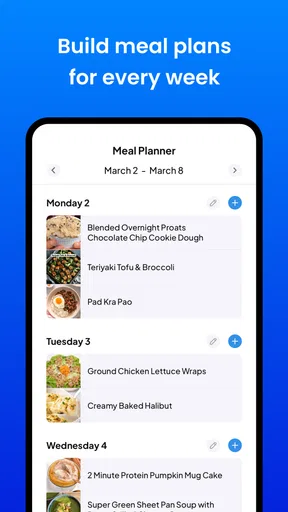
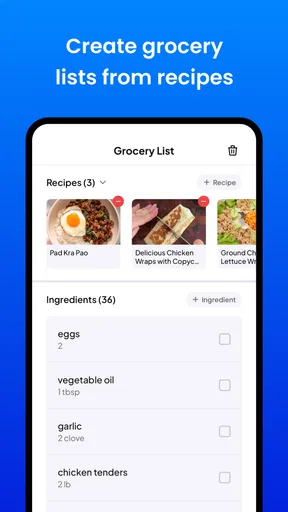
Another standout feature is the meal planning tool. You can plan your meals for the entire week, and the app will generate a shopping list for you. It’s extremely helpful for those of us who like to stay organized and avoid the dreaded "What’s for dinner?" question.
Cooking with Confidence
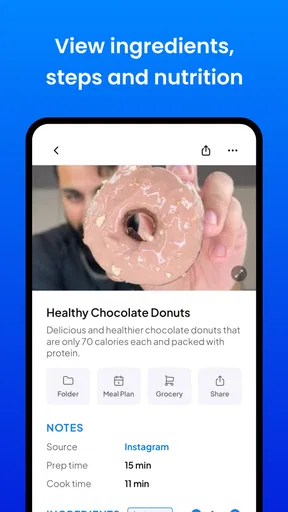
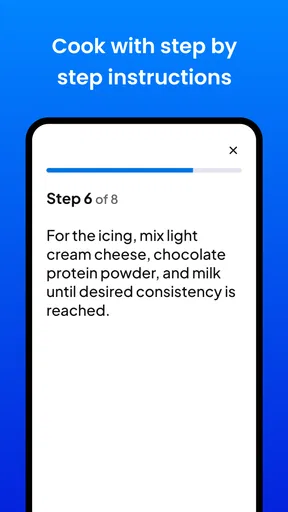
The app also includes step-by-step cooking instructions, which are detailed yet easy to follow. Each recipe comes with estimated cooking times and nutritional information, so you know exactly what you’re putting on the table. Plus, if you’re a visual learner like me, you’ll appreciate the gorgeous photos accompanying each recipe. It’s like flipping through a digital cookbook filled with culinary inspiration.
One of my favorite things is the community aspect of the app. You can share your own recipes and get feedback from other users. It’s a great way to discover new dishes and connect with fellow foodies around the world.
Personal Touch
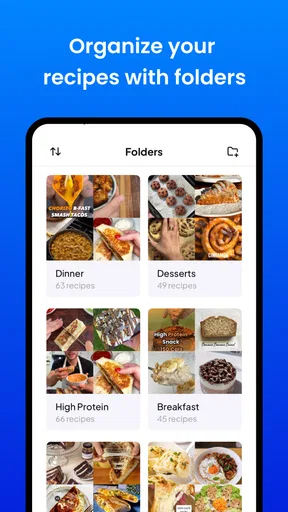
The app isn’t just about recipes; it’s about personalization. You can save your favorite recipes and even create custom collections for different occasions. Whether it’s a quick weekday dinner or an elaborate holiday feast, it has got you covered.
Final Thoughts
If you’re looking to spice up your culinary repertoire and make meal planning a breeze, it is definitely worth checking out. It’s like having a personal chef and nutritionist rolled into one handy app. So, go ahead, give it a whirl, and let it inspire your next delicious creation.
Ready to start cooking like a pro? You can download the app from the links provided and embark on your culinary adventure today. Bon appétit!
Pros
- Intuitive interface for easy navigation.
- AI suggests recipes based on preferences.
- Includes nutritional info for health tracking.
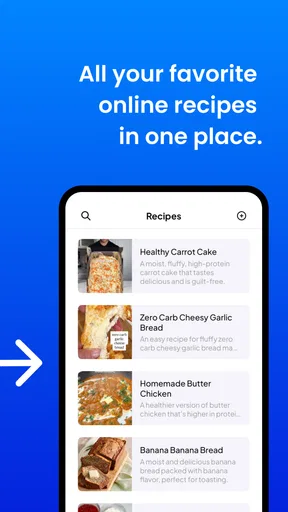
- Ability to save and organize favorite recipes.
- Works offline for easy access anywhere.
Cons
- Limited customization for dietary restrictions.
- Occasional inaccuracies in ingredient quantities.
- Premium features require a subscription.
- No option for user-generated content.
- Limited non-English language support.
FAQs for Inspo - Recipes & Meal Planner
What is Inspo - AI Recipe Keeper and how does it work?
Inspo - AI Recipe Keeper is a sophisticated app designed to help users organize and discover new recipes using AI technology. It allows users to input ingredients they have on hand, and the app suggests recipes that can be made with those items. The AI also learns from your preferences to tailor future suggestions.
Is Inspo - AI Recipe Keeper free to use or are there any in-app purchases?
Inspo - AI Recipe Keeper offers a free version with essential features. However, to access premium options like personalized meal planning and advanced recipe filters, users can opt for in-app purchases or a subscription plan. This allows users to choose the level of functionality they need.
Can I share my recipes and access community recipes on Inspo - AI Recipe Keeper?
Yes, Inspo - AI Recipe Keeper includes a community feature where users can share their favorite recipes and explore those shared by others. This social aspect fosters a rich culinary exchange and inspiration, enabling users to discover diverse recipes from around the world.
Does Inspo - AI Recipe Keeper support dietary restrictions and preferences?
Absolutely. The app is designed to accommodate various dietary needs, such as vegan, gluten-free, or keto diets. Users can set their preferences and restrictions, and the AI will filter and suggest recipes accordingly, ensuring that dietary requirements are always met.
How does Inspo - AI Recipe Keeper ensure the privacy and security of user data?
Inspo - AI Recipe Keeper prioritizes user privacy by adhering to strict data protection protocols. The app only collects necessary information to enhance user experience, and all personal data is encrypted. Users can review and manage their data settings within the app at any time.


